MZ မှာ code အတွက် syntax highlight လုပ်ချင်ပါက  ကို နှိပ်ပါ။

ထို အခါ code view ရောက်သွားမည်။ code view ထဲတွင် code ထည့်သည့်အခါ pre tag နှင့် ထည့်ရမည်။
<pre lang=”your language”>
ဒီနေရာမှာ code ထည့်ပါ။
</pre>
အောက်က ပုံလို မျိုး ထည့်သွင်းရေးရပါမည်။
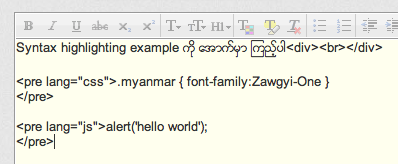
post တင်လိုက်တဲ့ အခါမှာတော့ syntax highlighting နှင့် ထွက်လာပါမည်။

အသုံးပြုလို့ရတဲ့ language တွေကတော့
- applescript
- actionscript3 as3
- bash shell
- coldfusion cf
- cpp c
- c# c-sharp csharp
- css
- delphi pascal
- diff patch pas
- erl erlang
- groovy
- java
- jfx javafx
- js jscript javascript
- perl pl
- php
- text plain
- py python
- ruby rails ror rb
- sass scss
- scala
- sql
- vb vbnet
- xml xhtml xslt html
ဒီ theme မှာ Syntax Highlighting plug in က အလုုပ်မလုုပ်ဘူးထင်တယ်ဗျ.. တခြားပိုု့စ်တွေမှာ မပေါ်တော့ဘူး. [lang name=”xhtml”] ဆိုုတာမျိုးတွေ ပေါ်နေတယ်
yes, it’s using old syntax highlighting sytle [lang name=”xml”] and we need to fix for new syntax highlight written style =(